If you are a small business owner in India, you’ve probably heard of Udyam Registration — the government’s initiative to simplify MSME (Micro, Small, and Medium Enterprises) registration. But what happens if you need to cancel your Udyam Registration? Whether it’s due to business closure, restructuring, or simply an error during registration, understanding udyam cancellation, udyam cancellation time, udyam cancellation status, and udyam registration cancellation online is crucial.
What is Udyam Registration?
Udyam Registration is a government-issued certificate for MSMEs in India.It replaces the earlier Udyog Aadhaar Memorandum (UAM) system. It provides businesses with recognition, access to schemes, subsidies, and easier loan approvals.
👉 But sometimes, businesses may need to cancel their registration. That’s where udyam cancellation comes in.
Why Would You Need Udyam Cancellation?
There are several reasons why a business owner might want to cancel their Udyam Registration:
· Business Closure: If your enterprise shuts down permanently.
· Change in Business Structure: For example, moving from proprietorship to partnership or private limited company.
· Duplicate Registration: If you mistakenly registered twice.
· Incorrect Information: Wrong details entered during registration.
· Merger or Acquisition: When your business merges with another entity.
💡 In all these cases, udyam registration cancellation online is the solution.
Udyam Cancellation Time
One of the most common questions business owners ask is: How long does it take to cancel Udyam Registration?
The udyam cancellation time usually depends on the accuracy of your application and the workload of the MSME department.
On average, it may take 7–15 working days for cancellation approval.
If documents are incomplete or incorrect, the process may take longer.
👉 Pro tip: Always double-check your details before submitting the cancellation request to avoid delays.
Udyam Cancellation Status
After applying for cancellation, you’ll want to know the udyam cancellation status. Here’s how you can track it:
Visit the official Udyam Registration portal.
Enter your Udyam Registration Number (URN).
Check the current status of your application.
You may see statuses like:
· Pending Review
· Under Process
· Approved
· Rejected (with reason)
💡 Keep your registered mobile number and email handy, as updates are often sent via SMS or email.
Udyam Registration Cancellation Online: Step-by-Step Guide
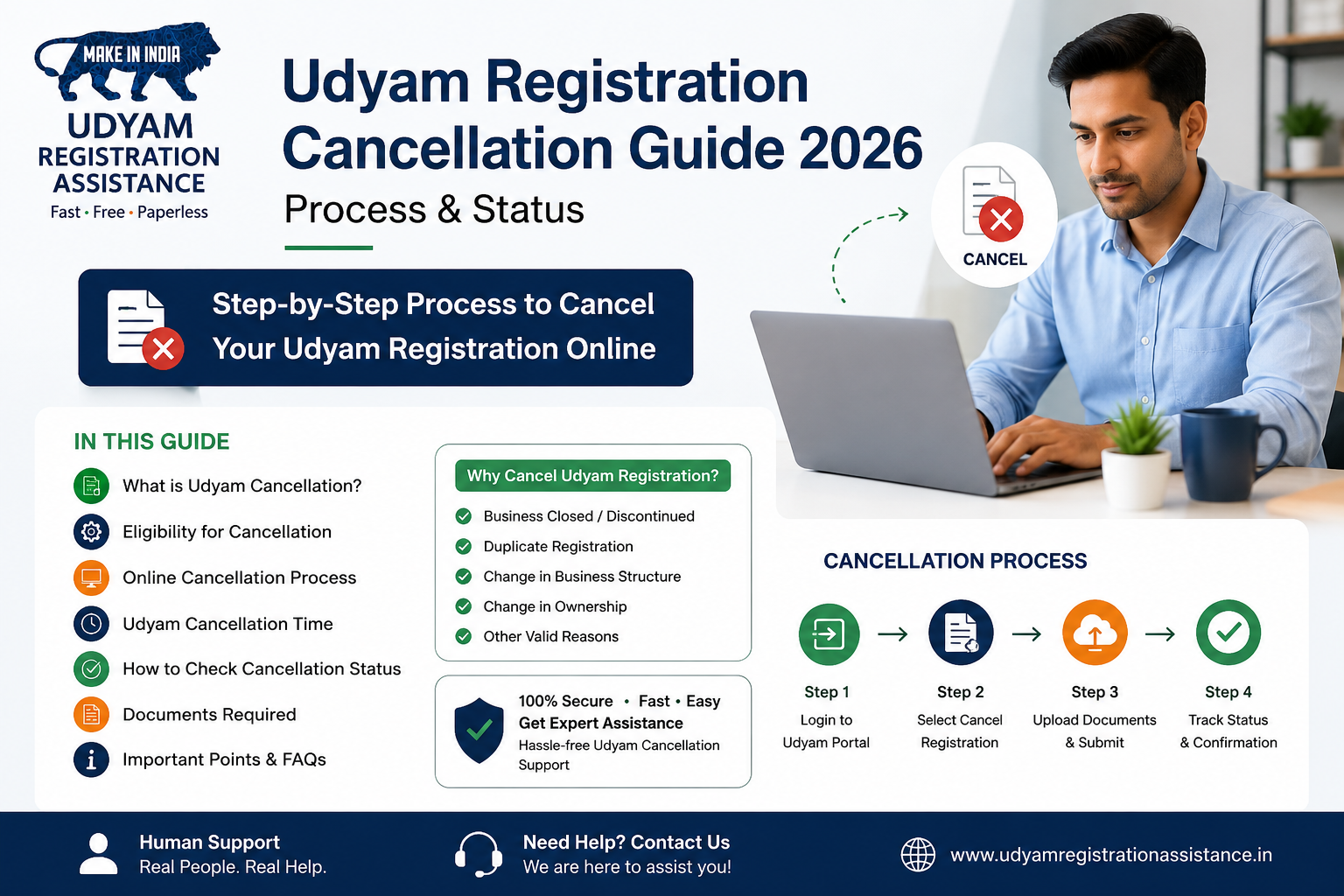
Here’s a simple breakdown of how to cancel your Udyam Registration online:
· Go to the Udyam Registration Portal
· Login with Credentials
· Use your Udyam Registration Number and mobile number linked with Aadhaar.
· Navigate to Cancellation Section
· Look for the option to cancel or deactivate your registration.
· Fill the Cancellation Form
· Provide reasons for cancellation.
· Upload supporting documents (closure certificate, merger documents, etc.).
· Submit Application
· Review details carefully before submission.
· Track Udyam Cancellation Status
· Use your URN to check progress.
Documents Required for Udyam Cancellation
To ensure smooth processing, keep these documents ready:
· Aadhaar card of the business owner.
· Udyam Registration Certificate.
· Proof of business closure (if applicable).
· Merger or restructuring documents (if applicable).
· Any government-issued ID proof.
Legal Implications of Udyam Cancellation
· Once cancelled, your business will no longer enjoy MSME benefits such as subsidies, loan schemes, or priority lending.
· You cannot reapply with the same URN; instead, you’ll need to register afresh if you restart operations.
· Ensure cancellation is truly necessary before proceeding.
Importance of Tracking Udyam Cancellation Status
Many business owners ignore tracking their udyam cancellation status, which can lead to confusion. Always monitor your application to:
· Ensure timely approval.
· Avoid legal complications.
· Stay updated on government records.
Common Problems During Udyam Cancellation
· Incorrect Aadhaar details.
· Mismatch in business closure documents.
· Technical glitches on the portal.
· Delay in approval due to high application volume.
👉 Solution: Double-check documents and keep screenshots of submissions.
Tips for Smooth Udyam Registration Cancellation Online
· Use the same mobile number and Aadhaar linked during registration.
· Keep scanned copies of documents ready.
· Track your udyam cancellation status regularly.
· Contact MSME helpdesk if delays exceed 15 working days.
MSME Helpline for Udyam Cancellation
If you face issues, you can contact the MSME helpline:
Udyam Registration Helpdesk (example format, check official site for updated contact).
Email support is also available via the Udyam portal.
Conclusion
Cancelling your Udyam Registration may seem daunting, but with the right guidance, it’s straightforward. Remember these key points:
Udyam cancellation is necessary if your business closes, merges, or has duplicate registration. The udyam cancellation time is usually 7–15 working days.
Always track your udyam cancellation status online. The udyam registration cancellation online process is free and simple if documents are correct.
By following the steps outlined above, you can ensure a smooth and hassle-free cancellation process.
FAQs on Udyam Cancellation
Q1: Can I cancel Udyam Registration anytime?
Answer: Yes, you can request cancellation at any time if you have valid reasons such as business closure or restructuring.
🔗 Source: Udyam Registration Portal (udyamregistration.gov.in in Bing)
Q2: What if my cancellation request is rejected?
Answer: You’ll receive a reason for rejection. Correct the issue and reapply online.
🔗 Source: MSME Ministry Guidelines
Q3: Is there a fee for Udyam cancellation?
Answer: No, the cancellation process is completely free of cost.
🔗 Source: Udyam Registration Portal (udyamregistration.gov.in in Bing)
Q4: Can I re-register after cancellation?
Answer: Yes, but you’ll need to apply as a new applicant with fresh details.
🔗 Source: MSME India
Q5: How long does Udyam cancellation take?
Answer: The udyam cancellation time is usually 7–15 working days depending on document accuracy.
🔗 Source: MSME Helpdesk (udyamregistration.gov.in in Bing)
Q6: How can I check Udyam cancellation status?
Answer: You can track your udyam cancellation status using your URN on the Udyam portal.
🔗 Source: Udyam Portal Status Check (udyamregistration.gov.in in Bing)
Q7: Can duplicate Udyam registrations be cancelled?
Answer: Yes, duplicate registrations can be cancelled by submitting a request online.
🔗 Source: MSME Guidelines
Q8: What documents are required for cancellation?
Answer: Aadhaar card, Udyam certificate, and proof of closure or restructuring.
🔗 Source: Udyam Portal (udyamregistration.gov.in in Bing)
Q9: Can cancellation be done offline?
Answer: No, udyam registration cancellation online is the only valid method.
🔗 Source: MSME Portal
Q10: Will I lose MSME benefits after cancellation?
Answer: Yes, cancellation removes access to subsidies, schemes, and loan benefits.
🔗 Source: MSME Benefits
Q11: Can I cancel if my business is merged?
Answer: Yes, mergers and acquisitions are valid reasons for cancellation.
🔗 Source: MSME Guidelines
Q12: Is Aadhaar mandatory for cancellation?
Answer: Yes, Aadhaar linked to the registration is required.
🔗 Source: Udyam Aadhaar Guidelines (udyamregistration.gov.in in Bing)
Q13: Can cancellation be done for proprietorship businesses?
Answer: Yes, proprietorships can cancel their Udyam Registration online.
🔗 Source: MSME Portal
Q14: What happens if I don’t cancel after closure?
Answer: Your business records may remain active, leading to compliance issues.
🔗 Source: MSME Compliance
Q15: Can cancellation be reversed?
Answer: No, once approved, cancellation cannot be reversed.
🔗 Source: Udyam Portal (udyamregistration.gov.in in Bing)
Q16: Do I need GST details for cancellation?
Answer: GST details may be required if linked during registration.
🔗 Source: GST & Udyam
Q17: Can I cancel using mobile OTP?
Answer: Yes, OTP verification is required during online cancellation.
🔗 Source: Udyam Portal (udyamregistration.gov.in in Bing)
Q18: Is cancellation applicable for partnership firms?
Answer: Yes, partnership firms can cancel their Udyam Registration.
🔗 Source: MSME Portal
Q19: Can I cancel if I entered wrong details?
Answer: Yes, incorrect information is a valid reason for cancellation.
🔗 Source: Udyam Guidelines (udyamregistration.gov.in in Bing)
Q20: Who can I contact for cancellation help?
Answer: You can reach the MSME helpdesk via the Udyam portal.
🔗 Source: MSME Helpdesk